Customer recovery before the one-star review goes public
Unhappy customers reach your manager privately, with the issue category, the comment, the customer's name, and a phone number. Your team gets a window — sometimes ten minutes — to apologize, fix the problem, and save the relationship before it becomes a public Google review that costs you the next prospect.
What is customer recovery in reputation management?
Customer recovery is the process of catching an unhappy customer privately, before they post a public negative review, and turning the experience around so they leave satisfied — or at least neutral. It is the single highest-leverage activity in reputation management for a local business: every successful recovery prevents a one-star review and preserves the relationship.
PulseBizz is built to make customer recovery the default workflow, not a heroic effort. Low ratings flow into a structured queue with the customer's contact info, the issue category, and the specific complaint. Your manager has everything they need to make the call before the customer has even left the parking lot.
Why most businesses lose unhappy customers
The default outcome for an unhappy customer is a public negative review. Recovery is what flips that outcome — and most businesses have nothing in place to make it happen.
You do not hear about complaints in time
By the time the unhappy customer's one-star review shows up on Google, you have lost. They are not coming back. The next 100 prospects searching for you will see that review before they see anything else.
Anonymous complaints can not be recovered
If you do not have the customer's contact information, recovery is impossible. You cannot apologize to a stranger. The complaint becomes a public review, and you never get the chance to make it right.
Generic alerts get ignored
An email saying "new feedback" with no context buried in a manager's inbox is worse than no alert at all. Recovery only happens when the alert lands on the right person, with full context, instantly.
There is no system to track which complaints got handled
Without resolution tracking, the same complaint can sit unaddressed for a week while staff assume "someone else" called the customer. The customer waits, gets angrier, and posts the review anyway.
Everything your team needs to recover, in one workflow
From the moment a low rating is submitted to the moment the issue is marked resolved, the system is built to compress recovery time.
Instant team alerts
When a customer submits a one, two, or three-star rating, your team gets notified immediately — not in a daily digest. The alert lands on the right person, on the right device, with the rating and comment included. Speed is everything: a callback within ten minutes recovers most relationships.
Required issue category and comment
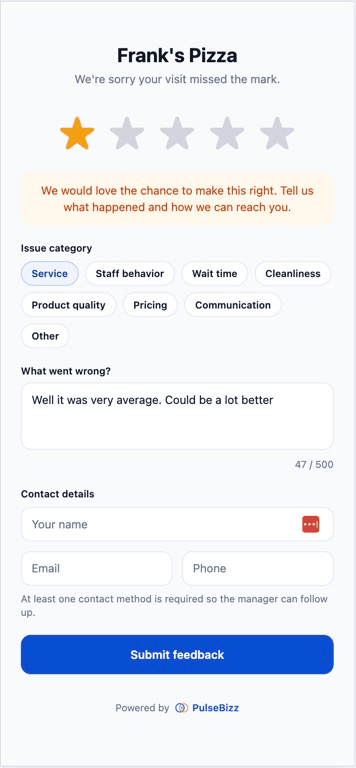
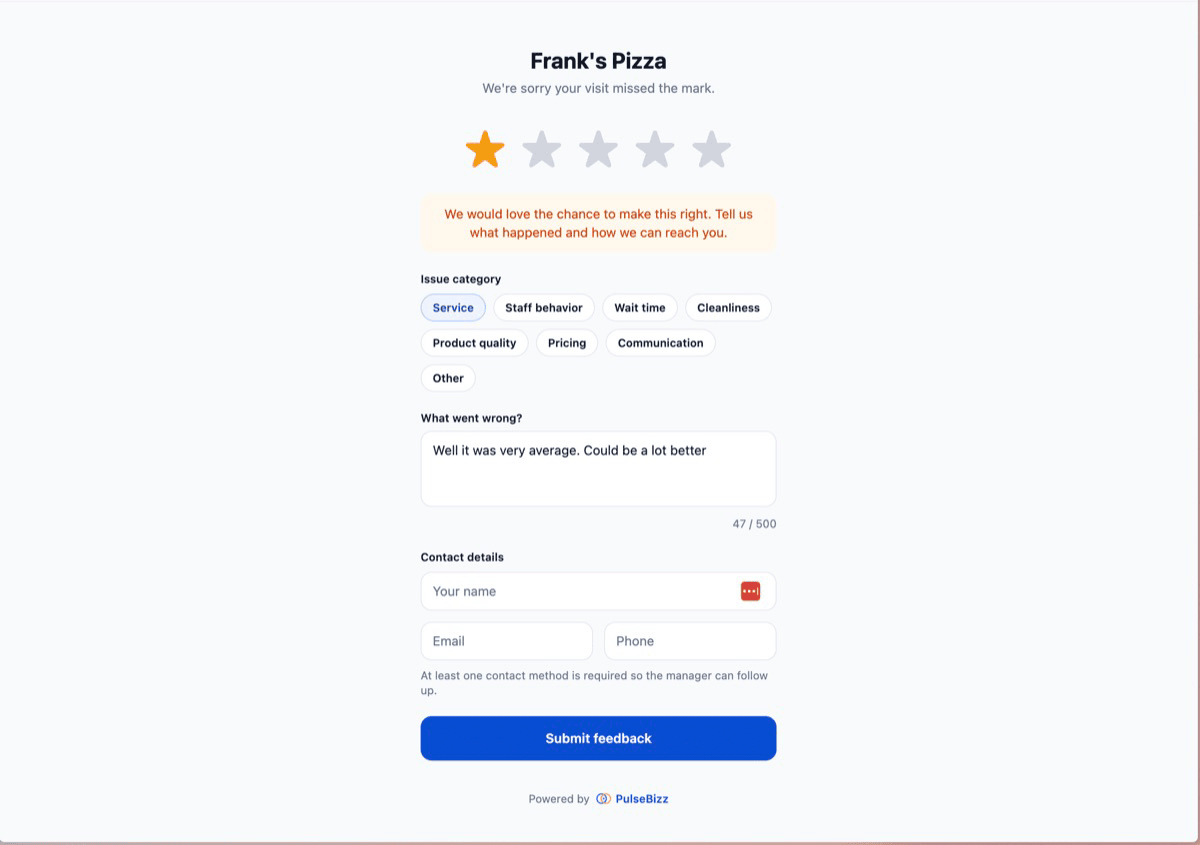
Low ratings cannot be submitted vaguely. The customer must select an issue category — service, staff, wait time, cleanliness, product, pricing, communication, other — and write a detailed comment. Your manager opens the alert and knows exactly what went wrong.
Mandatory contact information capture
Low ratings require the customer's name and at least one contact method — email or phone. No anonymous complaints. The manager has what they need to make a recovery call before the customer is even in the parking lot.
Resolution tracking with status badges
Each unresolved low rating shows a visual badge in the dashboard until your team marks it resolved. No item gets forgotten. No "I thought someone else called them" mistakes. The queue shrinks as recoveries close.
Tap-to-call from the dashboard
Each item shows the customer's phone number as a tap-to-call link. Manager opens the alert, taps the number, has the conversation. No copy-paste, no looking up the phone, no friction between knowing and acting.
Pattern detection across complaints
When the same issue category shows up multiple times in a week — three slow-service complaints, four staff-behavior reports — the dashboard surfaces the pattern. Recovery is per-customer; pattern detection prevents the next batch of complaints.
Three steps from setup to first result
Customer submits low rating
Through your branded portal, with required issue category, detailed comment, name, and contact info. Anonymous low ratings are not allowed.
Your team gets alerted instantly
Real-time notification with full context — rating, category, comment, contact info — to the right person on the right device.
Recover and mark resolved
Manager calls within minutes, apologizes, fixes the issue, and marks the item resolved. The badge clears. The public review never gets written.
Where recovery saves your business
Every recovered customer is a public review that did not get written. Over a year, the math compounds dramatically.
The cold meal at the restaurant
Diner rates two stars, comments "steak was undercooked, server forgot the wine." Manager calls within ten minutes, comps the meal, sends dessert to the table. Customer leaves recovered. No Google review.
The botched haircut
Client gives one star with comment "layers are uneven." Salon owner calls, books a free fix with a senior stylist, follows up with a complimentary product. Client returns the next month as a regular.
The slow plumbing job
Customer rates three stars about long wait times. Plumber owner calls, apologizes, offers a 20% discount on the next service. Customer signs up for the annual maintenance plan.
The dental cleaning complaint
Patient rates two stars, comment about a rough hygienist. Practice manager calls, schedules with a different hygienist next visit, the patient stays with the practice for the next decade.
The auto repair miscommunication
Customer rates two stars about being charged for an unauthorized part. Shop owner reviews the work order, refunds the part, walks the customer through the actual repair done. Customer returns and refers two friends.
The hotel room issue
Guest rates one star at checkout about a broken AC. Front desk manager catches the alert, comps the night, books a free upgrade for their next stay. The TripAdvisor review never appears.
Common questions about customer recovery
How fast does the team get alerted when a low rating comes in?
Within seconds. Alerts are real-time, not daily digests. The right person on the team gets the notification on their phone or email immediately, with rating, comment, and contact info included.
What if the unhappy customer refuses to provide contact information?
They cannot submit. The form requires name and at least one contact method (email or phone) for any rating below four stars. Without that information, recovery would be impossible — so the form does not allow it.
Does the customer know their information is being shared with management?
Yes. The form is transparent: the customer is told upfront that their feedback and contact info are sent to the business management team for follow-up. There is no hidden data collection.
What if a customer wants to leave a public Google review anyway, even after recovery?
They can. PulseBizz does not block them. The point of recovery is to resolve the issue first; some customers will still post publicly, but most will not when the problem has actually been fixed. And recovered customers often come back to update their initial complaint with a kinder version.
Can I see how many customer recoveries my team has handled?
Yes. The dashboard tracks resolved versus unresolved low ratings, so you can see your recovery rate over time. Per-team-member recovery tracking is on the roadmap.
How long does the average recovery call take?
Most recovery calls are five to ten minutes. The customer wants to feel heard and to know their complaint is being taken seriously. Listening, apologizing, and offering a small remedy (a free fix, a discount, a comp) handles most cases. Complex issues take longer; vague complaints are usually harmless.
Catch unhappy customers before Google does.
Explore related features
Feedback Dashboard
Where the recovery queue lives — sorted by what needs attention now.
Learn more →Feedback Collection
The smart form that captures the data your team needs to recover.
Learn more →Google Review Routing
Why happy customers go to Google and unhappy ones come to you.
Learn more →Looking for the full picture? See the complete reputation management software breakdown or compare plans on pricing .