A feedback dashboard built for the people running the floor
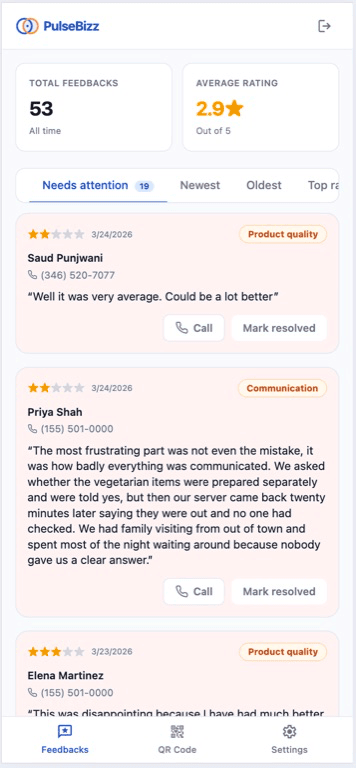
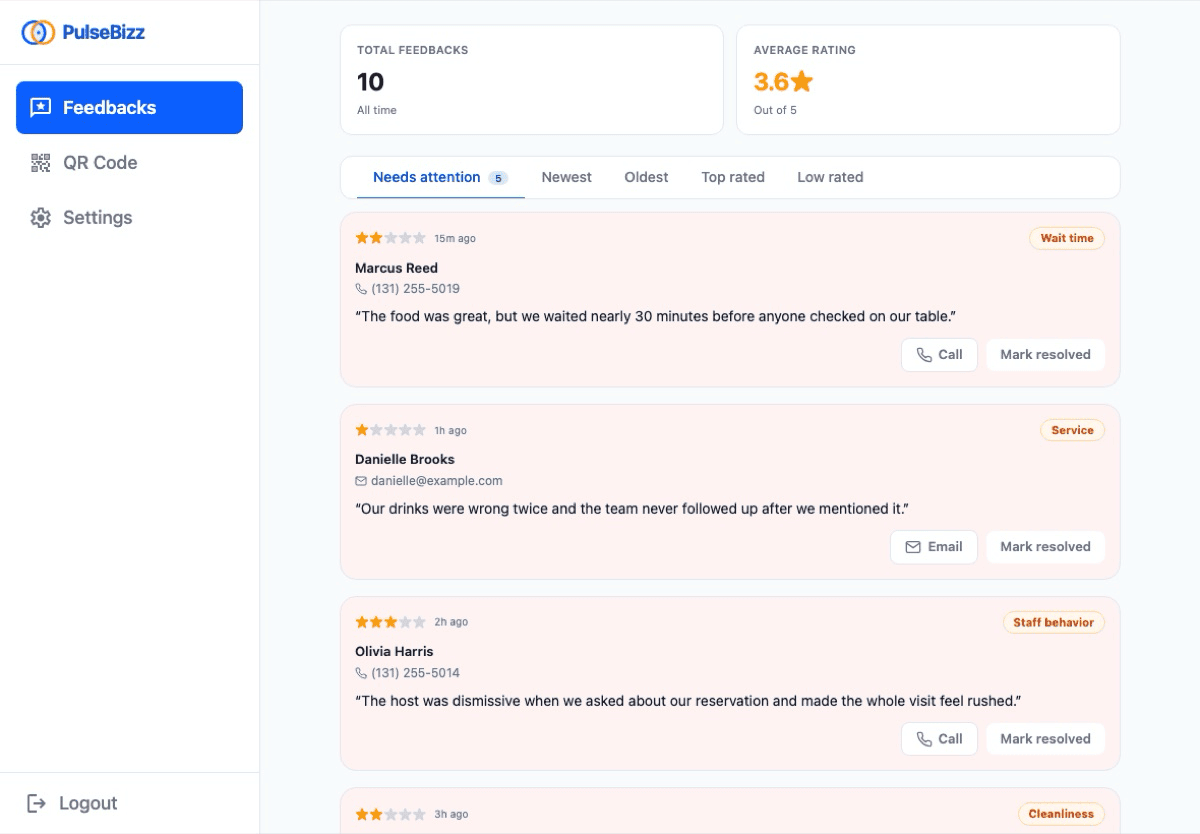
Every piece of customer feedback in one feed. Sort by what needs attention now, by newest, by lowest rated. Mark issues resolved as you handle them. No 14-tab analytics, no AI sentiment scoring nobody asked for — just the feed your floor manager actually uses.
What is a customer feedback dashboard?
A customer feedback dashboard is a single screen that shows every rating, comment, and contact your business has received — sorted so the items that need a response are at the top. It is the operations side of reputation management: not analytics for a quarterly review, but a feed for the manager on shift today.
Most reputation tools assume a marketing team. PulseBizz assumes a floor manager, a clinic owner, a salon operator. The dashboard surfaces what matters — what is unresolved, what is recent, what is low-rated — and stops there. It works on a phone between appointments, not just a desk between meetings.
Why most feedback dashboards collect dust
There is no shortage of reputation management dashboards. Most of them are unusable for the people who actually run small businesses.
14-tab dashboards no one opens
Sentiment analysis, NPS calculation, cohort breakdowns, AI summaries — all the dashboards a chief revenue officer wants and zero of the dashboards the salon owner needs. The owner ignores it after week one.
No clear priority order
Feedback shows up in chronological order. The two-star complaint from yesterday that needs a callback is buried under five 5-star ones from this morning. The manager scrolls past the urgent thing.
No way to mark issues handled
Without a resolved/unresolved toggle, the same complaint shows up day after day. The manager loses track of what is open and what is closed. Important customers fall through the cracks.
Phone access is broken or missing
Most reputation tools were built for desktop. The salon owner is between appointments on her phone, not at a desk. If the dashboard does not work mobile-first, it does not work at all.
Operational dashboard, not a vanity dashboard
Every feature in the dashboard exists to help someone act on a piece of feedback in the next ten minutes.
Needs Attention queue
Unresolved low-rated feedback rises to the top with a visual alert badge. The manager opens the dashboard and sees exactly what needs a callback today, in priority order, without scrolling.
Smart sort filters
Sort by Needs Attention, Newest, Oldest, Top Rated, or Low Rated. The default view is whatever your business actually needs to see first thing every morning.
Resolution tracking
Mark each piece of feedback as resolved or unresolved. The badge clears once you have followed up. No spreadsheets, no sticky notes, no asking the team if anyone called the unhappy customer back.
Issue category view
Group low-rated feedback by category — service, staff, wait time, cleanliness — to spot patterns. Three complaints about wait times in one week shows up as a pattern, not just noise.
Direct contact links
Each feedback item with contact info shows a tap-to-call and tap-to-email button. Manager opens the item, taps the phone number, has the conversation. No copy-paste between the dashboard and the phone app.
At-a-glance metrics
Total feedback, average rating, low-rating alert count — all visible at the top of the dashboard. No drill-downs needed. The owner knows the state of the reputation in three seconds.
Three steps from setup to first result
Feedback flows in
QR scans, link clicks, branded subdomain visits — every submission lands in the dashboard automatically.
Triage by priority
The Needs Attention sort puts unresolved low-rated items at the top. The manager opens the dashboard and starts at the top.
Act and mark resolved
Tap the phone number to call. Resolve the issue. Mark the item resolved. The badge clears, the queue shrinks, the day moves on.
How real businesses use the dashboard
The dashboard works the same way whether you run one location or twelve, and whether you check it once a day or every hour.
Morning triage routine
Salon owner opens the dashboard at 8am. Sorts by Needs Attention. Sees three unresolved low ratings from yesterday. Calls each one before opening the doors at 9.
Spotting a pattern fast
Restaurant manager notices three separate one-star comments mention wait time in the same week. Schedules a staff meeting that afternoon. The pattern would have hidden in chronological view.
Handing off resolution to a team
Multi-location owner assigns each location's manager to handle their own Needs Attention queue. The owner sees the rollup; the manager sees their site.
Following up between appointments
Dental practice manager has 15 minutes between cleanings. Opens the dashboard on her phone. Calls the unhappy patient. Marks resolved. Back to work.
Catching escalations before they happen
Auto repair shop sees a one-star with detailed comment about a botched alignment. Calls before the customer leaves a Google review. Re-does the work for free. Saves the relationship.
Weekly reputation review
Owner pulls the dashboard once a week. Looks at average rating trend, total feedback volume, and category breakdown. Spots which location is slipping before the next quarter's revenue tells the same story.
Common questions about feedback dashboard
Can I assign feedback items to specific team members?
Team-member assignment is on the roadmap. For now, multi-location accounts can route per-location alerts so the right manager sees the right items, but item-level assignment within a single location is not yet supported.
Does the dashboard work on mobile?
Yes. The dashboard is built mobile-first. Salon owners between appointments, restaurant managers on the floor, plumbers in the truck — they all check the dashboard on a phone. It loads fast and the touch targets are sized for thumbs.
What metrics does the at-a-glance section show?
Total feedback received all-time, average rating across all feedback, and the count of unresolved low-rated items needing attention. Per-location breakdowns are visible when you have multi-location accounts on the Pro plan.
Can I export feedback to a spreadsheet?
CSV export is available on the Pro plan. The dashboard also supports filtering and date-range views, which cover most of what people would do with a spreadsheet anyway.
How long is feedback stored?
All feedback is retained for the full duration of your subscription. There is no time-based deletion. Low-rated items retain their resolution status indefinitely so you can audit how your team handled past complaints.
Can I see my Google reviews in the same dashboard?
Yes. Once you connect your Google Business Profile, public Google reviews appear in the dashboard alongside private PulseBizz feedback. One view, full reputation picture.
Get the dashboard your floor staff will actually use.
Explore related features
Customer Recovery
Turn the dashboard's Needs Attention queue into actual recovered relationships.
Learn more →Feedback Collection
The smart form that fills the dashboard with structured, actionable feedback.
Learn more →Google Review Routing
How happy feedback skips the dashboard and goes straight to Google.
Learn more →Looking for the full picture? See the complete reputation management software breakdown or compare plans on pricing .